Your Notes. Your Context. Your AI.
Think Freely,
Everything Stays
Connected
Think Freely,
Everything Stays
Connected
Capture ideas however they come. Turn them into knowledge you can explore, build on, and put to work with AI.
Capture ideas however they come. Turn them into knowledge you can explore, build on, and put to work with AI.


Designed for mobile and tablets
Designed for mobile and tablet
Designed for mobile and tablets


Sources
Edit

Launch Plan Discussion
Aug 28 10:03 AM
Target Launch: Oct 6
Goal: Coordinate final production, marketing, and launch-day activities
Milestone
Owner
Final creative approval
Sophie
Landing page live
Maya
Final QA
Team
Creative Direction Deck
Aug 31, 1:20 PM

PPT

Weekly Team Sync
Aug 17, 12:40 PM
00:00:00
01:15:43
1x
Notes
Beta feedback looks promising
Need to simplify onboarding
Ask about launch timeline
Follow up with Sarah on Pricing
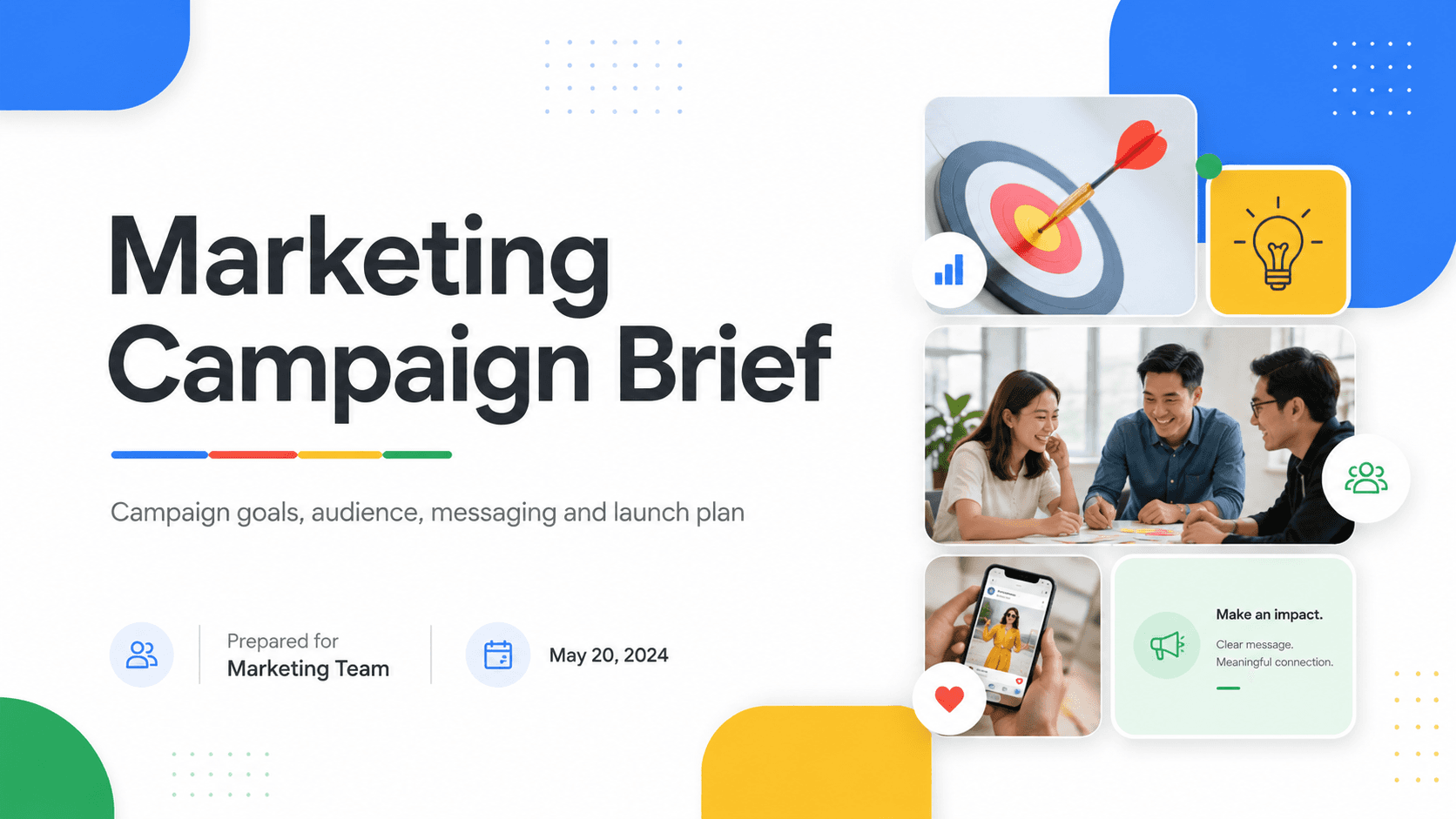
Marketing Campaign Brief
Sep 3, 4:50 PM
Ask anything
Weekly Team Sync
Today, 10:30 AM
Note
Action Items
Impact Priority Matrix
Summary
Campaign launches Oct 6. Team aligned on creative direction, channels, and next steps.
Key Updates
Creative concept approved
Short-form video is the priority
Creator outreach starts next week
Timeline
Milestone
Date
Creative Ready
Sep 12
Production
Sep 20
Launch
Oct 6
Action Items
Finalize Visuals — Sophie
Update Media Budget — Daniel
Shortlist Creators — Lucas
Summary
Campaign launches Oct 6. Team aligned on creative direction, channels, and next steps.
Campaign launched Oct 6. Early results are positive, with 90% of the waitlist onboarded.
Key Updates
90% of waitlist onboarded
Social media is the strongest-performing channel
Add launch and customer success videos to the website
Timeline
Milestone
Date
Post Launch Review
Oct 13
Action Items
Add launch + customer success videos — Sophie
Optimize ad copy from early results — Daniel
Scale social media campaigns — Lucas
Review launch feedback — Maya
5 Tasks · 2 Due This Week
Review Launch Feedback
High Priority
Review beta and early launch feedback to identify top issues, messaging gaps, and follow-up actions before launch.
Maya
Oct 17
Optimize Ad Copy from Early Results
High Priority
Refine headlines, hooks, and call-to-action messaging using insights from the first round of campaign performance.
Daniel
Oct 17
Finalize Creator Outreach Plan
High Priority
Confirm the creator shortlist, outreach messaging, and posting schedule so partnerships are ready ahead of launch.
Lucas
Oct 20
Add Launch + Customer Success Videos
Med Priority
Prepare short launch clips and customer success videos for the landing page, social posts, and promotional assets.
Sophie
Oct 22
Scale Social Media Campaigns
Med Priority
Expand the best-performing creatives and channels once launch assets and targeting are finalized.
Lucas
Oct 23
Impact × Priority Matrix
Impact
High Impact, Low Priority
Confirm launch timeline — Maya
Prepare landing page — Maya
High Impact, High Priority
Finalize campaign visuals — Sophie
Update media budget — Daniel
Shortlist creators — Lucas
Priority
Low Impact, Low Priority
Simplify onboarding from beta feedback
Low Impact, High Priority
Follow up with Sarah on pricing

Add to Note
Text
Type or paste text
Audio
Record or Upload Audio
Canvas
Add sketches or drawings
Documents
PDF, PPT, DOC and more
Take Photo
Capture a photo instantly
Gallery
Add Photos or Videos
Scan Documents
Scan papers and documents

notewise.dev
Links
Add online sources
6 Sources
Edit
Weekly Team Sync
Aug 17, 12:40 PM
00:00:00
01:15:43
1x
Notes
Revenue 92% target
Activation down again?
Need breakdown by region
Referral program pushed
Action:
- churn analysis
- onboarding update
Creative Direction Deck
Aug 22, 5:25 PM

PPT
Launch Plan Discussion
Aug 28 10:03 AM
Target Launch: Oct 6
Goal: Coordinate final production, marketing, and launch-day activities
Milestone
Owner
Final creative approval
Sophie
Landing page live
Maya
Final QA
Team
Marketing Campaign Brief
Sep 3, 4:50 PM

Website Plan
Sep 18, 9:10 AM

Launch Review Meeting
Oct 2, 11:15 AM
00:05:48
01:15:43
1x
Notes
Revenue 92% target
Activation down again?
Need breakdown by region
Referral program pushed
Action:
- churn analysis
- onboarding update
Ask anything
Weekly Team Sync
Today, 10:30 AM
Note
Action Items
Decision Log
Summary
Campaign launches Oct 6. Team aligned on creative direction, channels, and next steps.
Campaign launched Oct 6. Early results are positive, with 90% of the waitlist onboarded.
Key Updates
- Creative concept approved
- Short-form video is the priority
- Creator outreach starts next week
- 90% of waitlist onboarded
- Social media is the strongest-performing channel
- Add launch and customer success videos to the website
Timeline
Milestone
Date
Creative Ready
Sep 12
Production
Sep 20
Launch
Oct 6
Post Launch Review
Oct 13
Action Items
Finalize Visuals — Sophie
Update Media Budget — Daniel
Shortlist Creators — Lucas
Add launch + customer success videos — Sophie
Optimize ad copy from early results — Daniel
Scale social media campaigns — Lucas
Review launch feedback — Maya
Focus on What Matters
Turn what you’ve captured into clear, structured notes—surfacing the key ideas, details and next steps without losing where they came from.
Think It Through On Canvas
Write, sketch and arrange ideas freely on canvas—then keep every mark tied back to the notes it came from.
Mark Up Anything You Read
Highlight, comment and draw directly on PDFs and slides, keeping your notes with what you’re reading.
Ask Your Notes Anything
Ask questions across everything you’ve captured and get answers grounded in your own notes—with the passage it came from, every time.
Focus on What Matters
Turn what you’ve captured into clear, structured notes—surfacing the key ideas, details and next steps without losing where they came from.
Think It Through On Canvas
Write, sketch and arrange ideas freely on canvas—then keep every mark tied back to the notes it came from.
Mark Up Anything You Read
Highlight, comment and draw directly on PDFs and slides, keeping your notes with what you’re reading.
Ask Your Notes Anything
Ask questions across everything you’ve captured and get answers grounded in your own notes—with the passage it came from, every time.
6 Sources
Edit
Weekly Team Sync
Aug 17, 12:40 PM
00:00:00
01:15:43
1x
Notes
Revenue 92% target
Activation down again?
Need breakdown by region
Referral program pushed
Action:
- churn analysis
- onboarding update
Creative Direction Deck
Aug 22, 5:25 PM
PPT
Launch Plan Discussion
Aug 28 10:03 AM
Target Launch: Oct 6
Goal: Coordinate final production, marketing, and launch-day activities
Milestone
Owner
Final creative approval
Sophie
Landing page live
Maya
Final QA
Team
Marketing Campaign Brief
Sep 3, 4:50 PM
Website Plan
Sep 18, 9:10 AM
Launch Review Meeting
Oct 2, 11:15 AM
00:05:48
01:15:43
1x
Notes
Revenue 92% target
Activation down again?
Need breakdown by region
Referral program pushed
Action:
- churn analysis
- onboarding update
Ask anything
Weekly Team Sync
Today, 10:30 AM
Note
Action Items
Decision Log
Summary
Campaign launches Oct 6. Team aligned on creative direction, channels, and next steps.
Campaign launched Oct 6. Early results are positive, with 90% of the waitlist onboarded.
Key Updates
- Creative concept approved
- Short-form video is the priority
- Creator outreach starts next week
- 90% of waitlist onboarded
- Social media is the strongest-performing channel
- Add launch and customer success videos to the website
Timeline
Milestone
Date
Creative Ready
Sep 12
Production
Sep 20
Launch
Oct 6
Post Launch Review
Oct 13
Action Items
Finalize Visuals — Sophie
Update Media Budget — Daniel
Shortlist Creators — Lucas
Add launch + customer success videos — Sophie
Optimize ad copy from early results — Daniel
Scale social media campaigns — Lucas
Review launch feedback — Maya
Focus on What Matters
Turn what you’ve captured into clear, structured notes—surfacing the key ideas, details and next steps without losing where they came from.
Think It Through On Canvas
Write, sketch and arrange ideas freely on canvas—then keep every mark tied back to the notes it came from.
Mark Up Anything You Read
Highlight, comment and draw directly on PDFs and slides, keeping your notes with what you’re reading.
Ask Your Notes Anything
Ask questions across everything you’ve captured and get answers grounded in your own notes—with the passage it came from, every time.
Focus on What Matters
Turn what you’ve captured into clear, structured notes—surfacing the key ideas, details and next steps without losing where they came from.
Think It Through On Canvas
Write, sketch and arrange ideas freely on canvas—then keep every mark tied back to the notes it came from.
Mark Up Anything You Read
Highlight, comment and draw directly on PDFs and slides, keeping your notes with what you’re reading.
Ask Your Notes Anything
Ask questions across everything you’ve captured and get answers grounded in your own notes—with the passage it came from, every time.
6 Sources
Edit
Weekly Team Sync
Aug 17, 12:40 PM
00:00:00
01:15:43
1x
Notes
Revenue 92% target
Activation down again?
Need breakdown by region
Referral program pushed
Action:
- churn analysis
- onboarding update
Creative Direction Deck
Aug 22, 5:25 PM
PPT
Launch Plan Discussion
Aug 28 10:03 AM
Target Launch: Oct 6
Goal: Coordinate final production, marketing, and launch-day activities
Milestone
Owner
Final creative approval
Sophie
Landing page live
Maya
Final QA
Team
Marketing Campaign Brief
Sep 3, 4:50 PM
Website Plan
Sep 18, 9:10 AM
Launch Review Meeting
Oct 2, 11:15 AM
00:05:48
01:15:43
1x
Notes
Revenue 92% target
Activation down again?
Need breakdown by region
Referral program pushed
Action:
- churn analysis
- onboarding update
Ask anything
Weekly Team Sync
Today, 10:30 AM
Note
Action Items
Decision Log
Summary
Campaign launches Oct 6. Team aligned on creative direction, channels, and next steps.
Campaign launched Oct 6. Early results are positive, with 90% of the waitlist onboarded.
Key Updates
- Creative concept approved
- Short-form video is the priority
- Creator outreach starts next week
- 90% of waitlist onboarded
- Social media is the strongest-performing channel
- Add launch and customer success videos to the website
Timeline
Milestone
Date
Creative Ready
Sep 12
Production
Sep 20
Launch
Oct 6
Post Launch Review
Oct 13
Action Items
Finalize Visuals — Sophie
Update Media Budget — Daniel
Shortlist Creators — Lucas
Add launch + customer success videos — Sophie
Optimize ad copy from early results — Daniel
Scale social media campaigns — Lucas
Review launch feedback — Maya
Focus on What Matters
Turn what you’ve captured into clear, structured notes—surfacing the key ideas, details and next steps without losing where they came from.
Think It Through On Canvas
Write, sketch and arrange ideas freely on canvas—then keep every mark tied back to the notes it came from.
Mark Up Anything You Read
Highlight, comment and draw directly on PDFs and slides, keeping your notes with what you’re reading.
Ask Your Notes Anything
Ask questions across everything you’ve captured and get answers grounded in your own notes—with the passage it came from, every time.
Focus on What Matters
Turn what you’ve captured into clear, structured notes—surfacing the key ideas, details and next steps without losing where they came from.
Think It Through On Canvas
Write, sketch and arrange ideas freely on canvas—then keep every mark tied back to the notes it came from.
Mark Up Anything You Read
Highlight, comment and draw directly on PDFs and slides, keeping your notes with what you’re reading.
Ask Your Notes Anything
Ask questions across everything you’ve captured and get answers grounded in your own notes—with the passage it came from, every time.
6 Sources
Edit
Weekly Team Sync
Aug 17, 12:40 PM
00:00:00
01:15:43
1x
Notes
Revenue 92% target
Activation down again?
Need breakdown by region
Referral program pushed
Action:
- churn analysis
- onboarding update
Creative Direction Deck
Aug 22, 5:25 PM
PPT
Launch Plan Discussion
Aug 28 10:03 AM
Target Launch: Oct 6
Goal: Coordinate final production, marketing, and launch-day activities
Milestone
Owner
Final creative approval
Sophie
Landing page live
Maya
Final QA
Team
Marketing Campaign Brief
Sep 3, 4:50 PM
Website Plan
Sep 18, 9:10 AM
Launch Review Meeting
Oct 2, 11:15 AM
00:05:48
01:15:43
1x
Notes
Revenue 92% target
Activation down again?
Need breakdown by region
Referral program pushed
Action:
- churn analysis
- onboarding update
Ask anything
Weekly Team Sync
Today, 10:30 AM
Note
Action Items
Decision Log
Summary
Campaign launches Oct 6. Team aligned on creative direction, channels, and next steps.
Campaign launched Oct 6. Early results are positive, with 90% of the waitlist onboarded.
Key Updates
- Creative concept approved
- Short-form video is the priority
- Creator outreach starts next week
- 90% of waitlist onboarded
- Social media is the strongest-performing channel
- Add launch and customer success videos to the website
Timeline
Milestone
Date
Creative Ready
Sep 12
Production
Sep 20
Launch
Oct 6
Post Launch Review
Oct 13
Action Items
Finalize Visuals — Sophie
Update Media Budget — Daniel
Shortlist Creators — Lucas
Add launch + customer success videos — Sophie
Optimize ad copy from early results — Daniel
Scale social media campaigns — Lucas
Review launch feedback — Maya
Focus on What Matters
Turn what you’ve captured into clear, structured notes—surfacing the key ideas, details and next steps without losing where they came from.
Think It Through On Canvas
Write, sketch and arrange ideas freely on canvas—then keep every mark tied back to the notes it came from.
Mark Up Anything You Read
Highlight, comment and draw directly on PDFs and slides, keeping your notes with what you’re reading.
Ask Your Notes Anything
Ask questions across everything you’ve captured and get answers grounded in your own notes—with the passage it came from, every time.
Focus on What Matters
Turn what you’ve captured into clear, structured notes—surfacing the key ideas, details and next steps without losing where they came from.
Think It Through On Canvas
Write, sketch and arrange ideas freely on canvas—then keep every mark tied back to the notes it came from.
Mark Up Anything You Read
Highlight, comment and draw directly on PDFs and slides, keeping your notes with what you’re reading.
Ask Your Notes Anything
Ask questions across everything you’ve captured and get answers grounded in your own notes—with the passage it came from, every time.




Your Notes, Your Way
Capture Anything
Record your meetings, type a note or upload a file
Record your meetings, type it out or upload

Capture Anything
Record your meetings, type your thoughts, sketch your ideas
Sketch with Powerful Tools
Write and Sketch freely with Powerful Tools

Sketch with Powerful Tools
Write, Sketch, and Collaborate freely with Powerful Tools
Capture Anything
Record your meetings, type a note or upload a file
Capture Anything
Record your meetings, type your thoughts, sketch your ideas
Sketch with Powerful Tools
Write and Sketch freely with Powerful Tools
Sketch with Powerful Tools
Write, Sketch, and Collaborate freely with Powerful Tools

Your AI, Your Control
Customize how AI works and decide what gets added
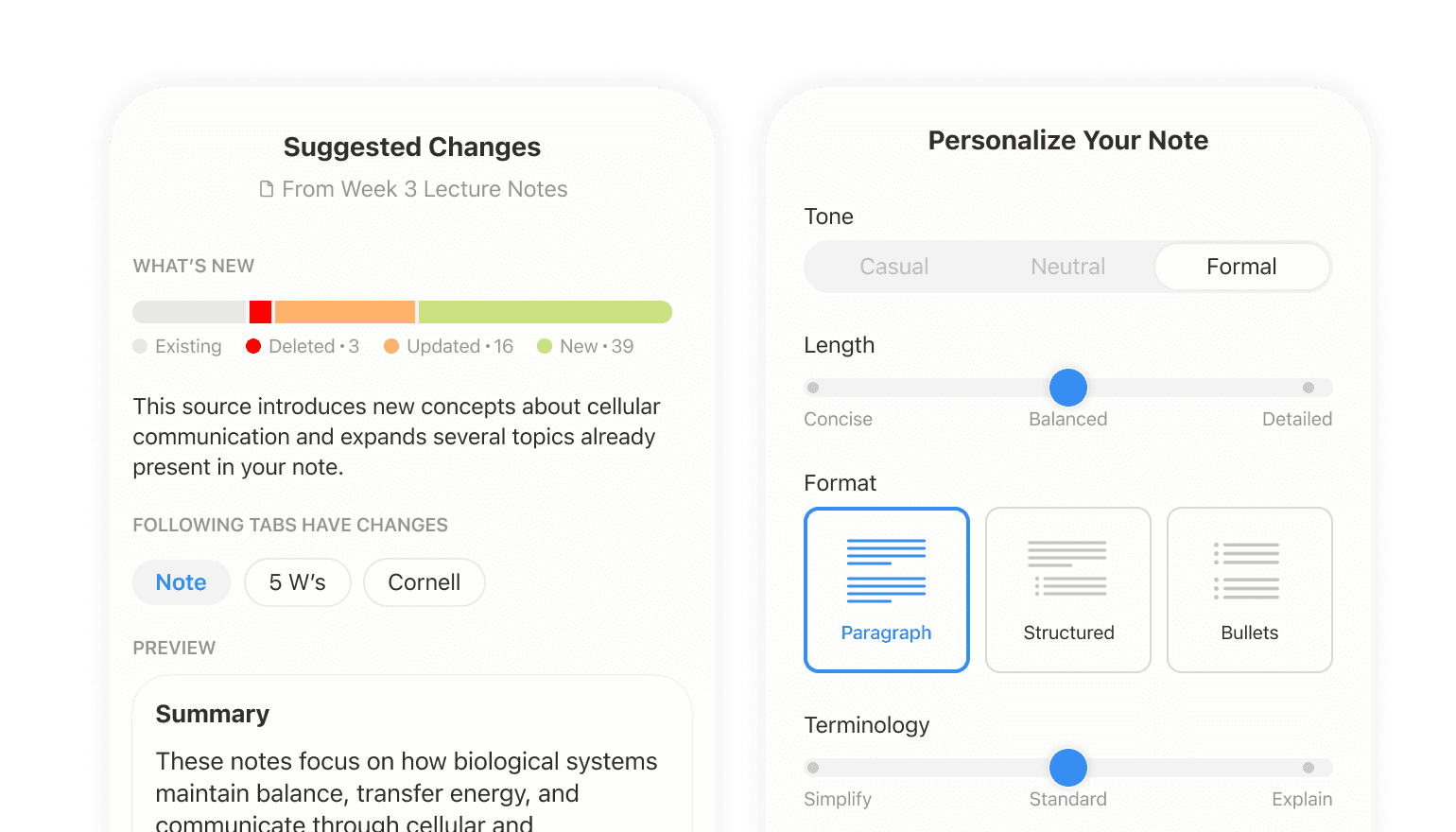
Your AI, Your Control
Customize how AI works and decide what gets added
View in Different Angles
Turn your note into different views and frameworks


View in Different Angles
Turn your note into different views and frameworks
Your AI, Your Control
Customize how AI works and decide what gets added
Your AI, Your Control
Customize how AI works and decide what gets added
View in Different Angles
Turn your note into different views and frameworks
View in Different Angles
Turn your note into different views and frameworks
Collaborate at Real Time
Edit the same canvas together, in real time

Collaborate at Real Time
Edit the same canvas together, in real time
Work Across Devices
Your notes stay synced wherever you work

Work Across Devices
Your notes stay synced wherever you continue working
Collaborate at Real Time
Edit the same canvas together, in real time
Collaborate at Real Time
Edit the same canvas together, in real time
Work Across Devices
Your notes stay synced wherever you work
Work Across Devices
Your notes stay synced wherever you continue working
Loved by note-takers around the world
This is a great app, it deserves 5 stars. Thank you team for the brilliant work.
Maulik Patel
Google Play Store
Notewise app is the best note taking app in the world. I am using it on Samsung Tab S11 Ultra for teaching.
Mayur Gund
Google Play Store
An incredibly good note taking program. I’m considering buying a subscription because of how good it is.
Quennie
Google Play Store
I was looking for an app to plan and have notes for my new book, and I was gonna settle with just a normal notes app but THIS is amazing!! It’s super visual — you can add images and texts and drawings. Definitely recommend.
Madison H
Google Play Store
As a student, I use Notewise almost every day for note-taking, PDF annotation, and exam revision. The handwriting experience is smooth, and the app is very convenient for organizing study materials. It has become one of my main study tools.
Acvora.io
App Store
There’s no ads and it’s just an amazing app. Love it!
L0TT3F0R3V3R
App Store
Go for it without any doubt.
Goutam
App Store
Constant new QOL updates.
FurHus
App Store
It has too many tools in it which is one of the point I like about this app.
Ace66778
App Store
Very simple and nice interface and very smooth for writing. Absolutely good app, I love Notewise a lot.
hemant jain1
App Store
Congratulations. A truly complete and resourceful application. I hope you can always enrich it with new and interesting features.
gianl3
App Store
Brilliant app with cross platform sync.
MangoEater99
App Store
Great function and reliability, worth it to upgrade!
yt6996
App Store
At first I looked in to the app and thought “just another notes app” just a few months later 4.0 arrived and now it’s better than ever!
BoldGreat
App Store
Highly recommend, helps me make amazing notes for studying
gamer girl
App Store
This app is all I need as an engineering student. Fits perfectly with any precise drawing.
Ghio_02
App Store
Perfect for engineering students like myself with their diverse choices for shapes. Very responsive support as well.
Bbobbbbbb
App Store
My personal favorite is that you are able to customize the stabilizer in each pen. But Notewise, it has more, such as highlighter, image input, and stickers. This is a dream come true!
SookiePearl
App Store
The interface is clean, simple, and very easy to use! Writing feels smooth, and cloud syncing is seamless too. The support team is very responsive and helpful when I reached out for support.
Janlijy
App Store
I have tried many many note taking Apps and this is by far the easiest and most usable App I have found. Keep up the great work Guys!!
RichardSangster
App Store
I found the app wonderful, with excellent features. I adapted really well to the tools, and it was great for my studies.
laueredia
Reddit
I have purchased so, so many annotation apps, and this is by far my favorite. It flawlessly syncs between my phone and tablet.
Samantha Back
Google Play Store
My favorite app by far. Absolutely perfect for my dark mode planner — I love the lock object feature, I haven’t seen that anywhere else. With Notewise, my iPad and Apple Pencil, it’s a digital planner’s dream! Get it — it’s great!
User from United States
App Store
I find it much easier to use than Goodnotes, and I can use it across different devices and operating systems. Super convenient.
Joanna Wu
Google Play Store
I tested more than 10 different note-taking apps. For features and writing quality, Notewise is the best.
Max Thiel
Google Play Store
I have finally found an app that allows me to make and sync notes from a Samsung phone to an iPad.
~BigBangLover~
App Store
The interface is clean, simple, and very easy to use! Writing feels smooth, and cloud syncing is seamless too. The support team is very responsive and helpful when I reached out for support. Perfect for focused note-taking without distractions and collaboration with others!
Janlijy
App Store
As a Tab S9 user, I regretted not having bought an iPad until I discovered Notewise. I am also one of the first users of both Notein and Starnote… for me, Notewise is far ahead of both of these apps.
benflodd
Reddit
Loved by note-takers around the world
This is a great app, it deserves 5 stars. Thank you team for the brilliant work.
Maulik Patel
Google Play Store
Notewise app is the best note taking app in the world. I am using it on Samsung Tab S11 Ultra for teaching.
Mayur Gund
Google Play Store
An incredibly good note taking program. I’m considering buying a subscription because of how good it is.
Quennie
Google Play Store
I was looking for an app to plan and have notes for my new book, and I was gonna settle with just a normal notes app but THIS is amazing!! It’s super visual — you can add images and texts and drawings. Definitely recommend.
Madison H
Google Play Store
As a student, I use Notewise almost every day for note-taking, PDF annotation, and exam revision. The handwriting experience is smooth, and the app is very convenient for organizing study materials. It has become one of my main study tools.
Acvora.io
App Store
There’s no ads and it’s just an amazing app. Love it!
L0TT3F0R3V3R
App Store
Go for it without any doubt.
Goutam
App Store
Constant new QOL updates.
FurHus
App Store
It has too many tools in it which is one of the point I like about this app.
Ace66778
App Store
Very simple and nice interface and very smooth for writing. Absolutely good app, I love Notewise a lot.
hemant jain1
App Store
Congratulations. A truly complete and resourceful application. I hope you can always enrich it with new and interesting features.
gianl3
App Store
Brilliant app with cross platform sync.
MangoEater99
App Store
Great function and reliability, worth it to upgrade!
yt6996
App Store
At first I looked in to the app and thought “just another notes app” just a few months later 4.0 arrived and now it’s better than ever!
BoldGreat
App Store
Highly recommend, helps me make amazing notes for studying
gamer girl
App Store
This app is all I need as an engineering student. Fits perfectly with any precise drawing.
Ghio_02
App Store
Perfect for engineering students like myself with their diverse choices for shapes. Very responsive support as well.
Bbobbbbbb
App Store
My personal favorite is that you are able to customize the stabilizer in each pen. But Notewise, it has more, such as highlighter, image input, and stickers. This is a dream come true!
SookiePearl
App Store
The interface is clean, simple, and very easy to use! Writing feels smooth, and cloud syncing is seamless too. The support team is very responsive and helpful when I reached out for support.
Janlijy
App Store
I have tried many many note taking Apps and this is by far the easiest and most usable App I have found. Keep up the great work Guys!!
RichardSangster
App Store
I found the app wonderful, with excellent features. I adapted really well to the tools, and it was great for my studies.
laueredia
Reddit
I have purchased so, so many annotation apps, and this is by far my favorite. It flawlessly syncs between my phone and tablet.
Samantha Back
Google Play Store
My favorite app by far. Absolutely perfect for my dark mode planner — I love the lock object feature, I haven’t seen that anywhere else. With Notewise, my iPad and Apple Pencil, it’s a digital planner’s dream! Get it — it’s great!
User from United States
App Store
I find it much easier to use than Goodnotes, and I can use it across different devices and operating systems. Super convenient.
Joanna Wu
Google Play Store
I tested more than 10 different note-taking apps. For features and writing quality, Notewise is the best.
Max Thiel
Google Play Store
I have finally found an app that allows me to make and sync notes from a Samsung phone to an iPad.
~BigBangLover~
App Store
The interface is clean, simple, and very easy to use! Writing feels smooth, and cloud syncing is seamless too. The support team is very responsive and helpful when I reached out for support. Perfect for focused note-taking without distractions and collaboration with others!
Janlijy
App Store
As a Tab S9 user, I regretted not having bought an iPad until I discovered Notewise. I am also one of the first users of both Notein and Starnote… for me, Notewise is far ahead of both of these apps.
benflodd
Reddit
Loved by note-takers around the world
This is a great app, it deserves 5 stars. Thank you team for the brilliant work.
Maulik Patel
Google Play Store
Notewise app is the best note taking app in the world. I am using it on Samsung Tab S11 Ultra for teaching.
Mayur Gund
Google Play Store
An incredibly good note taking program. I’m considering buying a subscription because of how good it is.
Quennie
Google Play Store
I was looking for an app to plan and have notes for my new book, and I was gonna settle with just a normal notes app but THIS is amazing!! It’s super visual — you can add images and texts and drawings. Definitely recommend.
Madison H
Google Play Store
As a student, I use Notewise almost every day for note-taking, PDF annotation, and exam revision. The handwriting experience is smooth, and the app is very convenient for organizing study materials. It has become one of my main study tools.
Acvora.io
App Store
There’s no ads and it’s just an amazing app. Love it!
L0TT3F0R3V3R
App Store
Go for it without any doubt.
Goutam
App Store
Constant new QOL updates.
FurHus
App Store
It has too many tools in it which is one of the point I like about this app.
Ace66778
App Store
Very simple and nice interface and very smooth for writing. Absolutely good app, I love Notewise a lot.
hemant jain1
App Store
Congratulations. A truly complete and resourceful application. I hope you can always enrich it with new and interesting features.
gianl3
App Store
Brilliant app with cross platform sync.
MangoEater99
App Store
Great function and reliability, worth it to upgrade!
yt6996
App Store
At first I looked in to the app and thought “just another notes app” just a few months later 4.0 arrived and now it’s better than ever!
BoldGreat
App Store
Highly recommend, helps me make amazing notes for studying
gamer girl
App Store
This app is all I need as an engineering student. Fits perfectly with any precise drawing.
Ghio_02
App Store
Perfect for engineering students like myself with their diverse choices for shapes. Very responsive support as well.
Bbobbbbbb
App Store
My personal favorite is that you are able to customize the stabilizer in each pen. But Notewise, it has more, such as highlighter, image input, and stickers. This is a dream come true!
SookiePearl
App Store
The interface is clean, simple, and very easy to use! Writing feels smooth, and cloud syncing is seamless too. The support team is very responsive and helpful when I reached out for support.
Janlijy
App Store
I have tried many many note taking Apps and this is by far the easiest and most usable App I have found. Keep up the great work Guys!!
RichardSangster
App Store
I have purchased so, so many annotation apps, and this is by far my favorite. It flawlessly syncs between my phone and tablet.
Samantha Back
Google Play Store
My favorite app by far. Absolutely perfect for my dark mode planner — I love the lock object feature, I haven’t seen that anywhere else. With Notewise, my iPad and Apple Pencil, it’s a digital planner’s dream! Get it — it’s great!
User from United States
App Store
I find it much easier to use than Goodnotes, and I can use it across different devices and operating systems. Super convenient.
Joanna Wu
Google Play Store
I tested more than 10 different note-taking apps. For features and writing quality, Notewise is the best.
Max Thiel
Google Play Store
I have finally found an app that allows me to make and sync notes from a Samsung phone to an iPad.
~BigBangLover~
App Store
The interface is clean, simple, and very easy to use! Writing feels smooth, and cloud syncing is seamless too. The support team is very responsive and helpful when I reached out for support. Perfect for focused note-taking without distractions and collaboration with others!
Janlijy
App Store
As a Tab S9 user, I regretted not having bought an iPad until I discovered Notewise. I am also one of the first users of both Notein and Starnote… for me, Notewise is far ahead of both of these apps.
benflodd
Reddit
Think as Humans,
Work like AI
Think as Humans,
Work like AI
Think as Humans,
Work like AI
Get Notewise


Latest news
· 3d
Designed for iPhone Duo: Note-Taking, Reimagined
Notewise is redesigned for iPhone Duo, with an expanded workspace, Book Mode reading, Seated Mode controls and Siri AI support in iOS 27.
Learn more


ZIIKR Pte. Ltd.
#01-08
2 Science Park Drive
Singapore 118222
ZIIKR Pte. Ltd.
#01-08
2 Science Park Drive
Singapore 118222
© 2026 ZIIKR Pte. Ltd.
All rights reserved.